How To Produce An eBook With Pages – Part 2

by patrick

In Part 1, I detailed the process of creating an eBook (in the ePub format) using Apple’s Pages application.

In this Part 2, I will quickly go over some considerations when inserting audio and video files into your eBook.

The large majority of eBook platforms read the EPub format, which is an open standard announced by the International Digital Publishing Forum (IDPF) in 2007. (It should be noted that Amazon’s Kindle reader does not read the EPub format.) Apple’s Pages application can create eBooks in the EPub format quite easily (see Part 1 of this series.)

While the EPub format does not currently have a mandatory support for audio or video file formats in EPub, it does appear that the IDPF is headed in that direction. In the meantime, Apple supports both audio and video file insertion into the EPub format for their devices. And this can be done in Pages.


Screen shot 2011 06 04 at 9.54.07 AM How To Produce An eBook With Pages – Part 2

Inserting an audio file.

Inserting Audio Files
The most important thing to know about inserting audio files into an eBook in Pages is that the audio file formats must be in either the .mp3 or .m4a formats. Then, it’s just a matter of inserting the file into the text using Pages’ Insert menu.

When the file is inserted, it looks like this.

Screen shot 2011 06 04 at 9.54.41 AM 300x82 How To Produce An eBook With Pages – Part 2

This is how the file appears in Pages.


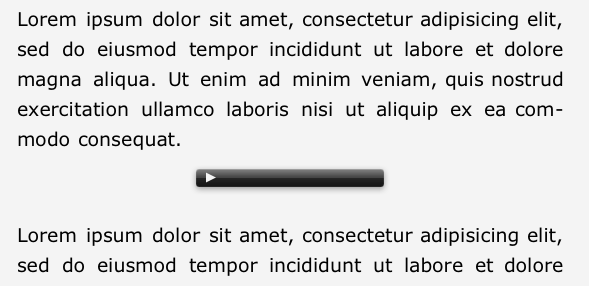
Once the document is exported into the EPub format and opened in an eBook reader, the audio file is embedded into the text and looks like this:
audioEmbed 300x145 How To Produce An eBook With Pages – Part 2

Audio in eBook.


To hear the audio, the eBook user simply clicks on the arrow in the black bar and the audio begins playing.

Inserting Video Files
The most important thing to know about embedding a video file is this: Video files MUST be in the .m4v format.

Otherwise, the embedding process is the same as it is for embedding audio files. I’ve also found that it helps to put a return before and after the position where the video file is embedded. This helps to create proper spacing, and it allows you to left, center, or right justify the position of the video window by applying this justification to the paragraphs before and after the video.

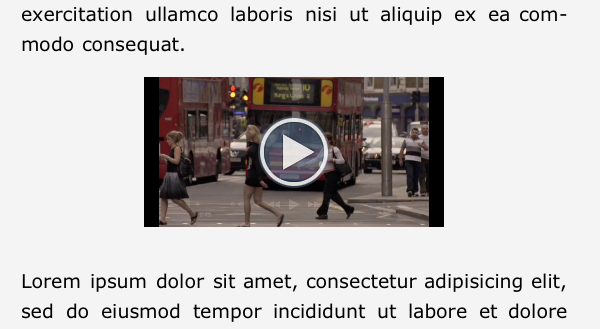
The video is embedded into the eBook and looks like this to the eBook reader:
videoEmbed 300x164 How To Produce An eBook With Pages – Part 2

The video in an eBook


EBook Production
The tools to create and self publish eBooks are now available on our desktops. This relatively recent trend makes it much easier for us to become both author and publisher. When you’re ready to distribute your eBook, check out Apple’s iBookstore.

{ 9 comments… read them below or add one }

Jerry Kolnick June 15, 2011 at 8:20 pm

Hi:

I am in the process of creating an eBook of my photographs. I have several questions.

1. How can I get one photo per page?
2. How can I have the Table of Contents show up as a page without having to select it on the top area? and

How can I make it hyperlink with the document?

Thank you very much.

Reply

Patrick June 16, 2011 at 11:34 am

To get one photo per page, you’d have to create a new section break for every page.

For the table of contents, you can simply duplicate the xml code generated for the TOC. The xml code automatically hyperlinks the pages. This does require that you generate the .epub document and then edit the xml code.

Reply

Jessica See July 20, 2011 at 7:27 pm

Cool! Very detailed information, thanks!

Reply

Axel Grube December 30, 2011 at 10:42 am

Hello Patrick,

thank you for the good explanation. I have a question about audio.
When i export an ePub from an pages document with mp3 files in it, the ending
of the mp3 files in the ePub changes always from .mp3 in .mov – also in all xhtml-files
Is this correct so or have i done a mistake?

thank you very much

Axel

Reply

patrick December 30, 2011 at 5:50 pm

Hi Axel,
Yes, you’ve done it right! The file will have a .mov ending because it’s the QuickTime player which is playing the audio. This is how Apple is implementing both audio and video embedding in EPUB format.

Eventually, I hope the IDPF will come up with open standards for audio and video embedding. But in the meantime, this works well.

Reply

Riddle February 10, 2012 at 7:28 am

Inserting an audio file.
How can I bring up the window with the choices (Insert, Format and Arrange) displayed at top of window in your illustration?
How to copy an audio file from available source to have it available to paste into pages?

Reply

Patrick February 10, 2012 at 9:27 am

Riddle, not sure I understand your question.

The Insert menu is one of the menu choices along the top (next to Format and Arrange). At the bottom of the Insert menu is the Choose… option. This will allow you to insert an .MP3 or .m4a file into the page.

Reply

wing man April 18, 2012 at 3:58 pm

Hi,

I’m creating an epub funnies. The page is basically a big picture. My problem is there is too much border space around the picture. I do noticed text can go closer to the edge. Is there a way of scaling the picture to where the text area? Also, is there a way of changing the background color or are are we stuck we white?

Thanks!

Reply

Nancy Spoolman April 30, 2012 at 9:19 am

Thanks for the tip about putting audio and video in an epub format. I didn’t think you could. I have a book almost done in iBooks Author, and had also done the ebook portion of it, without video and audio. What I’m finding, though, is that the epub drops a few of my pictures. I have tried redoing the picture and save it, resizing, everything. They are all inline in Pages. Very strange several will not appear in the book.

Reply

Leave a Comment

What is 2 + 7 ?
Please leave these two fields as-is:
IMPORTANT! To be able to proceed, you need to solve the following simple math (so we know that you are a human) :-)

Previous post:

Next post: